DATAMATH CALCULATOR MUSEUM
|
DATAMATH CALCULATOR MUSEUM |
When Nippon Calculating Machine Corp of Japan, better known under their brand Busicom, explored their options of using LSI (Large Scale Integration) PMOS (p-channel Metal–oxide Semiconductor) technology for their electronic calculators, they teamed up with two American Semiconductor companies:
|
• Intel: Desktop calculators with programmable functionality – Up to 16 digits capacity with optional printer • Mostek: Compact desktop calculators with fixed functionality – Up to 12 digits capacity, non-printing or printing |
The cooperation with Intel resulted in the famous 4004, the World’s first microprocessor, while Mostek’s MK6010 is recognized as the World's first "single-chip calculator circuit".
Busicom's earliest electronic desktop calculators like the Model 161 (July 1966) and Model 141 (November 1967) were using a mix of SSI (Small Scale Integration) DTL (Diode-Transistor Logic), discrete transistors and diodes
plus a magnetic core memory and it was the Model 120-DA introduced in April 1969 paving the way for the MK6010 design. The Model 120-DA was Busicom's first design using JMOS technology, mostly simple SSI devices for the logic but a few MSI (Medium Scale Integration) chips sprinkled in for both the Serial BCD (Binary Coded Decimal) Adder and the 48-bit Shift Registers for number storage. The successor of the Model 120-DA - introduced in January 1970 and consequently named Model 120-DB - changed the decimal point switch from [0-1-2-3] to [0-2-3-4]. Within a few months, Busicom was able to squeeze the electronics of the Model 120-DB into a housing with roughly half the volume and the Model 120-DM, also known as Busicom Junior, was born. Its main electronics were distributed on two large printed circuit boards (PCBs), containing 22 Integrated Circuits
(ICs) in JMOS technology from Mitsubishi,
NEC and
Toshiba, complemented by around 220 discrete diodes and more than 100 resistors. It was the very same logic design that Busicom handed in Summer 1970 over to Mostek in Dallas, Texas; tasking the young company to integrate the circuitry
into a single chip manufactured in high-threshold, p-channel MOS technology, operating from
−12
Volts and −24 Volts.
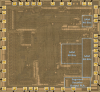 While Mostek originally estimated to be able to realize conversion of the circuitry from a mix of JMOS and Diode-Resistor logic to PMOS technology and provide the layout of the chip within a couple of weeks, the actual work took about three months and the first working samples of the MK6010 were manufactured in November 1970. The resulting chip is integrating more than 2,100 transistors in 360 gates plus 160 flip-flops and measures around 185 mils * 170 mils / 4.7 mm * 4.3 mm.
With the goal to keep as many parts of the Busicom Junior untouched while replacing its two large PCBs with a smaller one, the MK6010 inherited consequently many features from the original logic design:
|
• Two power supply rails, VDD =
−12.5 V and VGG = −22.5 V • Two-phase clock with 25 kHz nominal frequency • Negative logic for keyboard inputs • BCD-encoded numeral inputs with "Zero" encoded as 'BCD 1010' or "Ten" with "No Key" encoded as 'BCD 0000' • Negative logic of Digit and Segment outputs for easy interfacing to low-voltage VF Displays • Fix-point arithmetic with decimal point set at position 0, 2, 3, or 4 • [C] key performing a hardware reset, in combination with the negative logic of the Digit and Segment outputs resulting in displaying '888888888888' while the key is depressed • Dividing numbers by Zero results in an infinite loop that can be interrupted only with the [C] key • Displaying '0.0.0.0.0.0.0.0.0.0.0.0.' for input or calculating overflow • Buggy behavior when switching decimal point position amid pending calculations |
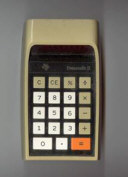
When Busicom finally introduced early in 1971 the second generation of the portable desktop calculator Model 120-DM or Junior, it looked at first glance identical to its predecessor but its housing is actually 0.5” (12 mm) slimmer due to the reduction from two large Logic-PCBs and the smaller Display-PCB to just one Main-PCB containing the MK6010 "single-chip calculator chip", the discrete keyboard interface, 12 low-voltage VF-Display tubes and the necessary transistors for the display. Neither the keyboard nor the power supply changed between the two iterations of the calculator.
Busicom realized the potential of applying Mostek's ion-implantation process to the chip design and the resulting MK6010L "low-voltage, low-power" version of the MK6010 allowed the design of the incredible "HANDY-LE" LE-120A calculator.
The Busicom LE-120A is today credited with many "Firsts":
|
• First truly pocket-sized electronic calculator • First hand-held calculator using a "single-chip calculator circuit" • First use of an LED (Light-emitting Diode) display with an electronic calculator • First calculator operated with disposable batteries |
Unfortunately, the many "Firsts" did not immediately translate into a massive sales success as observed with the later Hewlett Packard HP-35 using the same playbook. The LE-120A with its unique metal-cast body and its 12-digit LED display was very expensive and when Busicom started lowering the manufacturing costs by switching to a plastic body (LE-120S), changing the display size to 10-digits (LE-100A) and even 8-digits (LE-80S, LE-80A and LE-80B); competition was already up and running and leading to the start of the "Calculator War" – with Busicom being in 1974 the first casualty of a Japanese calculator manufacturer.
As the leading "MK6" in the product identification of the Mostek MK6010 indicates, was it manufactured exclusively for Busicom and not available for other customers. Cal-Tex Semiconductor, a startup founded in 1971 by former Texas Instruments employees and established in Santa Clara, CA with some financial backing from from Eiko Business Machine Co., Ltd. in Japan – better known under their brand Unitrex - understood the void and developed started immediately a 100% functional compatible calculator chip. When Cal-Tex introduced their CT5001 in November 1971, one year after the original MK6010, it made its way immediately into the very successful Unitrex 1200 (Type 27) desktop calculator.
With LED displays accounting for a significant portion of the BOM (Bill of Materials) of early electronic handheld calculators, Mostek redesigned in the second half of 1971 the MK6010L to support a 10-digit display instead of the original 12-digit version. This modification effectively circumvented Busicom's exclusivity rights to the original MK6010/MK6010L design while also reducing manufacturing costs.
The resulting MK5010 chip found its way into the Rapidman 800, developed by Rapid Data Systems & Equipment Ltd. of Canada. Introduced in February 1972, the Rapidman 800 is widely recognized as the first electronic calculator to retail for less than $100 (approximately $775 in 2025 dollars). Interestingly, the Rapidman 800 - as well as all other known calculators based on the MK5010 - featured an 8-digit display.
Mostek’s Product Portfolio in November 1971 consisted of three single-chip calculator circuits:
|
• MK6010 – Original Busicom design • MK6010L – Low-voltage version of MK6010 • MK5010 – 10-digit variation of the MK6010L |
Busicom on the other hand started early in 1972 to struggle financially and decided to forfeit its right of exclusivity, resulting in Mostek rebranding the MK6010 to MK5011 and its low power sibling MK6010L to MK5012 – triggering a price war with the newly introduced Cal-Tex CT5001. While the CT5001's 100% "socket-compatibility" with the MK6010 and consequently MK5011 looked at first glance as an advantage, did it change into a major disadvantage. While Mostek was not only designing Integrating Circuits including their layout, did they manufacture silicon wafers and had their own packaging and testing capacity. Cal-Tex on the other hand was a pure chip design company and relied on third-party companies for production and testing, not the best position in a price war. Eiko as an example, dropped the CT5001 within a few months and replaced it in their bestselling Unitrex 1200 (Type 37) with Mostek's MK5011.
By January 1972, Mostek's Product Portfolio for the general market comprised three devices tracing back to the MK6010 developed for Busicom:
|
• MK5010 – 10-digit variation of the MK5012 • MK5011 – Original MK6010 design • MK5012 – Low-voltage version MK6010L |
Mostek added in Spring 1972 the MK5013/MK5014 Chipset for 12-digit desktop calculators with Memory function to its Product Portfolio, complemented with the MK5015 support chip to interface with the Seiko 102 Printer. This chipset was originally developed for Busicom's non-printing desktop calculator Model 121-DK and the printing desktop calculator Model Model 121-PK.
|
• MK5013 – MK6018 12-digit chipset • MK5014 – MK6019 12-digit chipset • MK5015 – MK6025 Seiko 102 Printer Support |
With the introduction of the TMS1802 from Texas Instruments in September 1971, later renamed to TMS0100 Product Family, both the MK5011 and its siblings MK5010 and MK5012 were outdated and even Busicom switched in Summer/Fall 1972 with their LE-80A and LE-100A calculators to the TMS0105 and TMS0106, respectively; allowing for Floating-Point and Constant calculations and offering a much enhanced Error handling.
QUICK-LINK to Mostek Calculator Integrated Circuits.
| Type | Calculators | Keyboard | Constant (M-D-A-S) |
Digits | Fixed DP | Rounding | Special Functions |
Seg./Dig. Blanking |
(6,7,9) Font |
Seg. H | Entry Overflow Calculating Overflow |
| MK6010 | Busicom Junior | [+=][−=] | X-X-X-X | 12 | [0,2,3,4] | None | None | NONE S1, S8 |
 |
 |
 |
| MK5011 | Unitrex 1200 (Type 37) | [+=][−=] | X-X-X-X | 12 | [0,2,3,4] | None | None | NONE S1, S8 |
|
|
|
| Description | Comments | |
| Architecture | Single-chip Calculator | First Generation |
| Category | Register Processor | Bit-serial |
| Related |
MK6010L MK5012 CT5001 |
Busicom Low-voltage version Commercial Low-voltage version Second Source |
| ROM Size | n.a. | |
| RAM Size | 108 Bits | 2 Registers * 48 Bits (12 Digits) 12 Status Bits |
| Outputs | 12 Digits 9 Segments 1 Status |
External VFD Digit Drivers External VFD Segment Drivers Sign |
| Inputs | 4 Keyboard 6 Keyboard 2 Decimal Select 1 Clear |
Numerals BCD Functions Discrete 0, 2, 3, 4 Active Low |
Capacity: Up to 12 digits (positive and negative)
Logic: Algebraic Adding Machine Logic
[2] [x] [3] [+=] [4] [x] [5] [+=] → '20.'
Number Entry: Right-justified number entry, entering a thirteenth digit is resulting in an overflow condition and is only recoverable using the [C] key
[0 2 3 4]: [1] [2] [3] [4] [5] [6] [7] [8] [9] [0] [1] [2] [3] → '0.0.0.0.0.0.0.0.0.0.0.0.'
Decimal Point: First entered decimal point is used, additional decimal point entries are ignored
[0 2 3 4]: [1] [.] [2] [.] [3] → '1.23'
Fixed Decimal Point: The decimal point can be set to [0 2 3 4] digits
[0 2 3 4]: [1] [+=] [2] [+=] → '3.000'
Clear: Automatic power-up clear implemented. [C] key clears the whole calculator, [CE] key clears last entry of a number
[0 2 3 4]: [1] [+=] [2] [C] [3] [+=] → '3.'; [1] [+=] [2] [CE] [3] [+=] → '4.'
Change Sign: Not supported. When performing multiplication or division, a negative value can only be assigned to the first number by pressing the [−=] key after entering the number
[0 2 3 4]: [2] [−=] [x] [3] [+=] → '- 6.'; [2] [x] [3] [−=] → '-1.'
Number Display: Right-justified number display with leading-zero suppression
Negative Numbers: Negative numbers are shown with an active signal at a dedicated output pin and usually connected to a discrete LED indicator
Calculating Overflow: An overflow results in displaying all zeros with all decimal points lit and is only recoverable using the [C] key
[0 2 3 4]: [1] [2] [3] [4] [5] [x] [1] [2] [3] [4] [5] [+=] → '0.0.0.0.0.0.0.0.0.0.0.0.', [C] → '0.0000'
Divide By Zero: A division of a positive or negative number by zero results in an infinity loop with the display blanked and is only recoverable using the [C] key
[0 2 3 4]: [1] [:] [0] [+=] → ' ', [C] → '0.'
Display Test: Pressing the [C] or [CE] key lit up all 12 digits of the display
[C] → '888888888888', [CE] → '888888888888'
Rounding: Rounding of displayed calculating results is not supported
[0 2 3 4]: [2] [0] [:] [3] [+=] → '6.666'
Known Calculator Logic Bugs:
Negative Zero Bug : Certain calculations result in displaying a negative zero
[0 2 3 4]: [1] [−=] → '-1.', [1] [+=] → '-0.'
Divide to Negative Zero Bug: Certain calculations result in displaying a negative zero
[0 2 3 4]: [0] [.] [0] [0] [0] [1] [−=] → '-0.0001', [:] [1] [0] [+=] → '-0.0000'
Fix Point Switch Bug: Changing the position of the Fix Point Switch during number entry leads to unexpected results
[0 2 3 4]: [1] [.] [2] [3] → '1.23', [0 2 3 4]: [+=] → '1230000'
Twelfth Digit Multiplication Bug: Multiplications with the sum of digits for multiplicand and multiplier larger than twelve result in an overflow
[0 2 3 4]: [1] [2] [3] [4] [5] [6] [7] [8] [9] [0] [1] [2] [x] → '123456789012.', [1] [+=] → '0.0.0.0.0.0.0.0.0.0.0.0.'
[0 2 3 4]: [6] [5] [4] [3] [2] [1] [x] → '654321.', [6] [5] [4] [3] [2] [1] [+=] → '428135971041.'
Twelfth Digit Division Bug: Divisions with the dividend or the divisor larger than eleven digits result in an overflow
[0 2 3 4]: [1] [2] [3] [4] [5] [6] [7] [8] [9] [0] [1] [2] [:] → '123456789012.', [1] [+=] → '0.0.0.0.0.0.0.0.0.0.0.0.'
[0 2 3 4]: [1] [:] → '1.', [1] [2] [3] [4] [5] [6] [7] [8] [9] [0] [1] [2] [+=] → '0.0.0.0.0.0.0.0.0.0.0.0.'
| Item | Min | Typ | Max | Unit | Comments |
| VSS | 0 | V | |||
| VDD | -12.5 | V | |||
| VGG | -22.5 | V | |||
| IDD | 2.0 | mA | REXT = 100k Ohm, Segment- and | ||
| IGG | 1.0 | mA | Digit-Driver Load 100k Ohm to VDD | ||
| Ext. CK | 25 | kHz | Two-phase clock | ||
| CP1 Width | 10 | us | Active low | ||
| CP2 Width | 10 | us | Active low | ||
| CP1 to CP2 Delay | 10 | us | Between pulses |
DISPLAY TESTING
Pulling the KC or KCE Inputs of the MK6010/MK5011 to VDD or VGG (log.1) by pressing the [C] or [CE] keys is resulting in all Segment Outputs SA to SH activated for the 12 Digit Outputs D1 to D12, displaying '888888888888'.
Pulling the KC or KCE Inputs of the MK6010/MK5011 back to VSS (log.0) by releasing the [C] or [CE] clears the display.
CALCULATING OVERFLOW
An overflow condition of the MK6010/MK5011 is resulting in the Segment Outputs SA to SF and SDP activated for the 12 Digit Outputs D1 to D12, displaying '0.0.0.0.0.0.0.0.0.0.0.0.'.
The overflow condition is only recoverable using the [C] key.
DIVIDE BY ZERO LOOP
A division of a positive or negative number by zero of the MK6010/MK5011 is resulting in the Segment Outputs SA to SF disabled, SG and SH activated and SDP pulsing while the 12 Digit Outputs D1 to D12 are disabled, hence blanking the display.
The Divide by Zero Loop is only recoverable using the [C] key.
DIGIT DRIVERS
The MK6010/MK5011 single-chip calculator circuit is manufactured in a PMOS process and its Digit Scanning Outputs are high-side PMOS transistors. For easy interfacing to low-voltage VFDs (Vacuum Fluorescent Displays) or high-voltage gas-discharge displays, an activated digit corresponds to a logical 0 or open output. All other, non-activated digits have the PMOS transistors turned on. We characterized here at the Datamath Calculator Museum the Digit Driver Output pin D2 of an MK5011 and measured an output resistance of around 150 Ohm at an Output Voltage of -1.0 V.
SEGMENT DRIVERS
The MK6010/MK5011 single-chip calculator circuit is manufactured in a PMOS process and its Segment Outputs are high-side PMOS transistors. For easy interfacing to low-voltage VFDs or high-voltage gas-discharge displays, an activated segment corresponds to a logical 0 or open output. We characterized here at the Datamath Calculator Museum the Segment Driver Output pin SG of an MK5011 and measured an output resistance of 150 Ohm at an Output Voltage of -1.0 V.
The Datamath Calculator Museum DCM-50A (PLAYGROUND) supports the Characterization of the MK6010 and MK5011 single-chip calculator circuits using the DCM-50A Playground MK6010 Adapter mounted on top of the DCM-50A PG Digit Inverter Frame Carrier and connected to the DCM-50A PG KBD102 Keyboard configured to MK6010 Mode. The voltage selector jumper on the MK6010 Adapter must be set to "high-voltage" (24 V). The optional DCM-50A Playground Digilent I/O Extender supports Characterization and Reverse-engineering of MK6010 and MK5011 single-chip calculator circuits.

The MK6010 and MK5011 are using a standard 0.6” wide 40-pin CDIP (Ceramic Dual In-line Package with a 0.1” / 2.54 mm lead pitch).
The "6010"-marked die used for the MK6010 and MK5011 was manufactured in a 10 um metal gate PMOS process (metal width = 0.40 mil / 10.0 um, metal spacing = 0.40 mil / 10.0 um, diffusion width = 0.40 mil / 10.0 um, diffusion spacing = 0.40 mil / 10.0 um).
The die size of the MK6010 is approximately 185 mils * 170 mils / 4.7 mm * 4.3 mm.
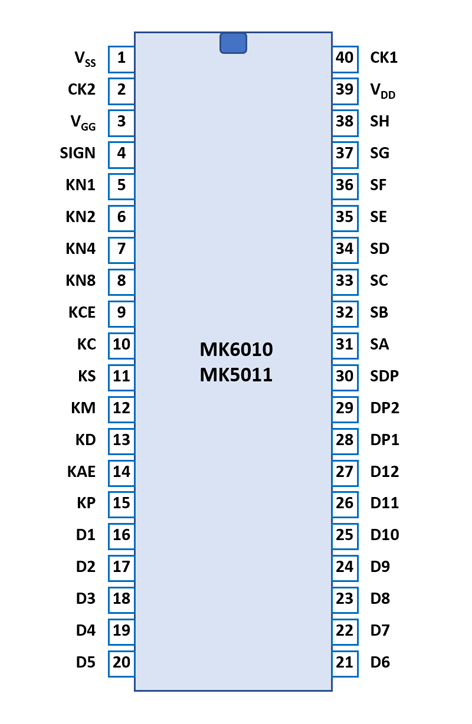
| Pin | IO | Function | Pin | IO | Function |
| 1 | V | Common Voltage VSS | 40 | I | Clock Phase 1 |
| 2 | I | Clock Phase 2 | 39 | V | Negative Voltage VDD |
| 3 | V | Negative Voltage VGG | 38 | O | Segment driver H |
| 4 | O | Sign driver | 37 | O | Segment driver G |
| 5 | I | Encoded Key input '1' | 36 | O | Segment driver F |
| 6 | I | Encoded Key input '2' | 35 | O | Segment driver E |
| 7 | I | Encoded Key input '4' | 34 | O | Segment driver D |
| 8 | I | Encoded Key input '8' | 33 | O | Segment driver C |
| 9 | I | Key input [CE] | 32 | O | Segment driver B |
| 10 | I | Key input [C] | 31 | O | Segment driver A |
| 11 | I | Key input [−=] | 30 | O | Segment driver DP |
| 12 | I | Key input [x] | 29 | I | Decimal Point Sel.2 |
| 13 | I | Key input [:] | 28 | I | Decimal Point Sel.1 |
| 14 | I | Key input [+=] | 27 | O | Digit driver 12 (MSD) |
| 15 | I | Key input [.] | 26 | O | Digit driver 11 |
| 16 | O | Digit driver 1 (LSD) | 25 | O | Digit driver 10 |
| 17 | O | Digit driver 2 | 24 | O | Digit driver 9 |
| 18 | O | Digit driver 3 | 23 | O | Digit driver 8 |
| 19 | O | Digit driver 4 | 22 | O | Digit driver 7 |
| 20 | O | Digit driver 5 | 21 | O | Digit driver 6 |
| The Segment drivers A-H and DP (Decimal Point) are connected to the display in the pictured way. | 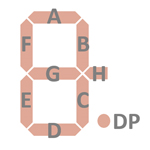 |
The keyboards of all calculators based on the MK6010 or MK5011 consist of 10 number keys connected between VDD or VGG (log.1) with a diode matrix to the key inputs KN1 to KN4 (Numbers) and 7 function keys connected between VDD or VGG (log.1) to discrete key inputs. The position of the Decimal Point is selected with 2 additional switch inputs DP1 and DP2.
MK6010/MK5011 | ||||
| KEY | KN8 | KN4 | KN2 | KN1 |
| [1] | - | - | - | log.1 |
| [2] | - | - | log.1 | - |
| [3] | - | - | log.1 | log.1 |
| [4] | - | log.1 | - | - |
| [5] | - | log.1 | - | log.1 |
| [6] | - | log.1 | log.1 | - |
| [7] | - | log.1 | log.1 | log.1 |
| [8] | log.1 | - | - | - |
| [9] | log.1 | - | - | log.1 |
| [0] | log.1 | - | log.1 | - |
MK6010/MK5011 | |||||||
| KEY | KC | KCE | KD | KM | KS | KAE | KP |
| [C] | log.1 | - | - | - | - | - | - |
| [CE] | - | log.1 | - | - | - | - | - |
| [÷] | - | - | log.1 | - | - | - | - |
| [×] | - | - | - | log.1 | - | - | - |
| [−=] | - | - | - | - | log.1 | - | - |
| [+=] | - | - | - | - | - | log.1 | - |
| [.] | - | - | - | - | - | - | log.1 |
MK6010
| ||
| SWITCH | DP2 | DP1 |
| [4-3-2-0] | - | - |
| [4-3-2-0] | - | log.1 |
| [4-3-2-0] | log.1 | - |
| [4-3-2-0] | log.1 | log.1 |
Scanning is performed in D1 → D12 direction at a rate of about 480 Hz:
|
• State Time = 0.5 Clocks = 0.020 ms @ CK=25 kHz • Digit Time = 8 States = 0.160 ms @ CK=25 kHz • Scan Time = 13 Digit Times (D1 to D13 with D13 a dead cycle) = 2.08 ms @ CK=25 kHz |
Calculators based on the MK6010 or MK5011 typically make use of 12-digit low-voltage VFDs (Vacuum Fluorescent Displays) or high-voltage gas-discharge displays.

If you have additions to the above datasheet please email: joerg@datamath.org.
© Joerg Woerner, March 8, 2026. No reprints
without written permission.